Visualizing CHESS temperature dependent data
Currently, there are two formats for CHESS data structures. The first was used prior to 2024, and was based on processing code written by Jacob Ruff. More recently, the beamline has switched to using nxrefine, a software plugin for NeXpy that allows for refinement of the scattering data.
Import functions
import matplotlib.pyplot as plt
from nxs_analysis_tools import TempDependence
from nxs_analysis_tools.datasets import cubic

sample_directory = cubic() # Download example data and store in cache directory
The TempDependence class
It is assumed that the folder structure of the temperature dependent scans is as follows:
samplename
└── labelname
    ├── 15
    ├── 100
    ├── 300
    ├── samplename_15.nxs
    ├── samplename_100.nxs
    ├── samplename_300.nxs
Here we create a TempDependence objecct called sample whose temperature folders are found in the path 'samplename/labelname/'. This can also be set separately using the .set_sample_directory() method.
sample = TempDependence(sample_directory)
Loading data
Option 1: Loading nxrefine processed data using load_transforms()
Use the load_transforms() method to load the “.nxs” files. All files ending with “.nxs” are imported.
sample.load_transforms()
data:NXdata
  @axes = ['Qh', 'Qk', 'Ql']
  @signal = 'counts'
  Qh = float64(100)
  Qk = float64(150)
  Ql = float64(200)
  counts = float64(100x150x200)
data:NXdata
  @axes = ['Qh', 'Qk', 'Ql']
  @signal = 'counts'
  Qh = float64(100)
  Qk = float64(150)
  Ql = float64(200)
  counts = float64(100x150x200)
data:NXdata
  @axes = ['Qh', 'Qk', 'Ql']
  @signal = 'counts'
  Qh = float64(100)
  Qk = float64(150)
  Ql = float64(200)
  counts = float64(100x150x200)
data:NXdata
  @axes = ['Qh', 'Qk', 'Ql']
  @signal = 'counts'
  Qh = float64(100)
  Qk = float64(150)
  Ql = float64(200)
  counts = float64(100x150x200)
data:NXdata
  @axes = ['Qh', 'Qk', 'Ql']
  @signal = 'counts'
  Qh = float64(100)
  Qk = float64(150)
  Ql = float64(200)
  counts = float64(100x150x200)
data:NXdata
  @axes = ['Qh', 'Qk', 'Ql']
  @signal = 'counts'
  Qh = float64(100)
  Qk = float64(150)
  Ql = float64(200)
  counts = float64(100x150x200)
data:NXdata
  @axes = ['Qh', 'Qk', 'Ql']
  @signal = 'counts'
  Qh = float64(100)
  Qk = float64(150)
  Ql = float64(200)
  counts = float64(100x150x200)
data:NXdata
  @axes = ['Qh', 'Qk', 'Ql']
  @signal = 'counts'
  Qh = float64(100)
  Qk = float64(150)
  Ql = float64(200)
  counts = float64(100x150x200)
data:NXdata
  @axes = ['Qh', 'Qk', 'Ql']
  @signal = 'counts'
  Qh = float64(100)
  Qk = float64(150)
  Ql = float64(200)
  counts = float64(100x150x200)
data:NXdata
  @axes = ['Qh', 'Qk', 'Ql']
  @signal = 'counts'
  Qh = float64(100)
  Qk = float64(150)
  Ql = float64(200)
  counts = float64(100x150x200)
data:NXdata
  @axes = ['Qh', 'Qk', 'Ql']
  @signal = 'counts'
  Qh = float64(100)
  Qk = float64(150)
  Ql = float64(200)
  counts = float64(100x150x200)
data:NXdata
  @axes = ['Qh', 'Qk', 'Ql']
  @signal = 'counts'
  Qh = float64(100)
  Qk = float64(150)
  Ql = float64(200)
  counts = float64(100x150x200)
data:NXdata
  @axes = ['Qh', 'Qk', 'Ql']
  @signal = 'counts'
  Qh = float64(100)
  Qk = float64(150)
  Ql = float64(200)
  counts = float64(100x150x200)
data:NXdata
  @axes = ['Qh', 'Qk', 'Ql']
  @signal = 'counts'
  Qh = float64(100)
  Qk = float64(150)
  Ql = float64(200)
  counts = float64(100x150x200)
data:NXdata
  @axes = ['Qh', 'Qk', 'Ql']
  @signal = 'counts'
  Qh = float64(100)
  Qk = float64(150)
  Ql = float64(200)
  counts = float64(100x150x200)
data:NXdata
  @axes = ['Qh', 'Qk', 'Ql']
  @signal = 'counts'
  Qh = float64(100)
  Qk = float64(150)
  Ql = float64(200)
  counts = float64(100x150x200)
data:NXdata
  @axes = ['Qh', 'Qk', 'Ql']
  @signal = 'counts'
  Qh = float64(100)
  Qk = float64(150)
  Ql = float64(200)
  counts = float64(100x150x200)
Option 2: Loading 3rot_hkli.nxs files using load_datasets()
Use the load_datasets() method to load the “.nxs” files. By default, all files ending with “hkli.nxs” are imported, but this can be changed using the file_ending parameter.
# Method for loading legacy CHESS data format
# sample.load_datasets(file_ending="hkli.nxs")
A subset of temperatures can be imported using the temperatures_list parameter. Temperatures can be listed here as numeric values ([15,300]) or as strings (['15','300']).
sample.load_transforms(temperatures_list=[15,300])

# For legacy CHESS data format
# sample.load_datasets(temperatures_list=[15,300])
data:NXdata
  @axes = ['Qh', 'Qk', 'Ql']
  @signal = 'counts'
  Qh = float64(100)
  Qk = float64(150)
  Ql = float64(200)
  counts = float64(100x150x200)
data:NXdata
  @axes = ['Qh', 'Qk', 'Ql']
  @signal = 'counts'
  Qh = float64(100)
  Qk = float64(150)
  Ql = float64(200)
  counts = float64(100x150x200)
Similarly, select temperatures can be ignored during loading using the exclude_temperatures parameter.
sample.load_datasets(exclude_temperatures=[25])
Accessing the data
The datasets are stored under the .datasets attribute of the TempDependence object.
sample.datasets
{'15': NXdata('data'),
 '25': NXdata('data'),
 '35': NXdata('data'),
 '45': NXdata('data'),
 '55': NXdata('data'),
 '65': NXdata('data'),
 '75': NXdata('data'),
 '80': NXdata('data'),
 '104': NXdata('data'),
 '128': NXdata('data'),
 '153': NXdata('data'),
 '177': NXdata('data'),
 '202': NXdata('data'),
 '226': NXdata('data'),
 '251': NXdata('data'),
 '275': NXdata('data'),
 '300': NXdata('data')}
Use square brackets to index the individual datasets in the NXentry. Each dataset is a NXdata object and possesses the corresponding attributes and methods.
sample.datasets['15']
NXdata('data')
A list of temperatures is stored in the .temperatures attribute of the TempDependence object.
sample.temperatures
['15',
 '35',
 '45',
 '55',
 '65',
 '75',
 '80',
 '104',
 '128',
 '153',
 '177',
 '202',
 '226',
 '251',
 '275',
 '300']
Visualizing the data
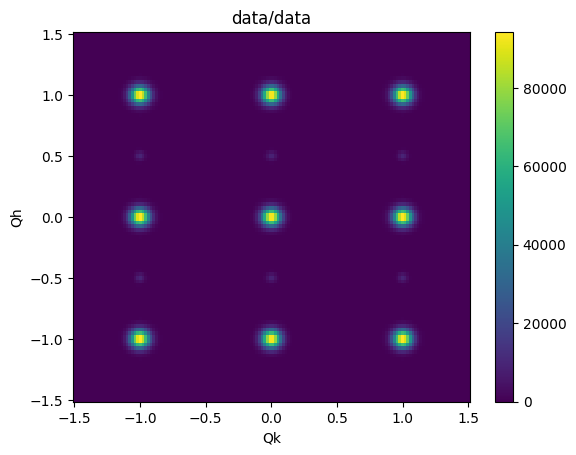
For example, each NXdata object has a .plot() method. Here we plot the L=0.0 plane.
sample.datasets['15'][:,:,0.0].plot()
Temperature dependent linecuts
Linecuts are performed using the Scissors class. An instance of the Scissors class is created for each temperature and stored in a dict attribute called scissors.
See documentation on the Scissors class for more information.
sample.scissors
{'15': <nxs_analysis_tools.datareduction.Scissors at 0x722744133100>,
 '25': <nxs_analysis_tools.datareduction.Scissors at 0x722744190c70>,
 '35': <nxs_analysis_tools.datareduction.Scissors at 0x7227441b6140>,
 '45': <nxs_analysis_tools.datareduction.Scissors at 0x7227441b5fc0>,
 '55': <nxs_analysis_tools.datareduction.Scissors at 0x7227441b62f0>,
 '65': <nxs_analysis_tools.datareduction.Scissors at 0x7227441b5cf0>,
 '75': <nxs_analysis_tools.datareduction.Scissors at 0x7227441b6bf0>,
 '80': <nxs_analysis_tools.datareduction.Scissors at 0x7227441b7d60>,
 '104': <nxs_analysis_tools.datareduction.Scissors at 0x7227441909a0>,
 '128': <nxs_analysis_tools.datareduction.Scissors at 0x722744190be0>,
 '153': <nxs_analysis_tools.datareduction.Scissors at 0x722744192c50>,
 '177': <nxs_analysis_tools.datareduction.Scissors at 0x722744193760>,
 '202': <nxs_analysis_tools.datareduction.Scissors at 0x722744190910>,
 '226': <nxs_analysis_tools.datareduction.Scissors at 0x722744192bf0>,
 '251': <nxs_analysis_tools.datareduction.Scissors at 0x722744193160>,
 '275': <nxs_analysis_tools.datareduction.Scissors at 0x7227441936a0>,
 '300': <nxs_analysis_tools.datareduction.Scissors at 0x7227441934c0>}
The individual Scissors objects can be indexed using square brackets and the temperature.
sample.scissors['15']
<nxs_analysis_tools.datareduction.Scissors at 0x722744133100>
Batch linecuts are peformed using a method of the TempDependence class called .cut_data(), which internally calls the .cut_data() method on each of the Scissors objects at each temperature.
# First, load all available temperatures
sample.load_transforms()

# Perform the linecut
sample.cut_data(center=(0,0,0), window=(0.75,0.2,0.1))
data:NXdata
  @axes = ['Qh', 'Qk', 'Ql']
  @signal = 'counts'
  Qh = float64(100)
  Qk = float64(150)
  Ql = float64(200)
  counts = float64(100x150x200)
data:NXdata
  @axes = ['Qh', 'Qk', 'Ql']
  @signal = 'counts'
  Qh = float64(100)
  Qk = float64(150)
  Ql = float64(200)
  counts = float64(100x150x200)
data:NXdata
  @axes = ['Qh', 'Qk', 'Ql']
  @signal = 'counts'
  Qh = float64(100)
  Qk = float64(150)
  Ql = float64(200)
  counts = float64(100x150x200)
data:NXdata
  @axes = ['Qh', 'Qk', 'Ql']
  @signal = 'counts'
  Qh = float64(100)
  Qk = float64(150)
  Ql = float64(200)
  counts = float64(100x150x200)
data:NXdata
  @axes = ['Qh', 'Qk', 'Ql']
  @signal = 'counts'
  Qh = float64(100)
  Qk = float64(150)
  Ql = float64(200)
  counts = float64(100x150x200)
data:NXdata
  @axes = ['Qh', 'Qk', 'Ql']
  @signal = 'counts'
  Qh = float64(100)
  Qk = float64(150)
  Ql = float64(200)
  counts = float64(100x150x200)
data:NXdata
  @axes = ['Qh', 'Qk', 'Ql']
  @signal = 'counts'
  Qh = float64(100)
  Qk = float64(150)
  Ql = float64(200)
  counts = float64(100x150x200)
data:NXdata
  @axes = ['Qh', 'Qk', 'Ql']
  @signal = 'counts'
  Qh = float64(100)
  Qk = float64(150)
  Ql = float64(200)
  counts = float64(100x150x200)
data:NXdata
  @axes = ['Qh', 'Qk', 'Ql']
  @signal = 'counts'
  Qh = float64(100)
  Qk = float64(150)
  Ql = float64(200)
  counts = float64(100x150x200)
data:NXdata
  @axes = ['Qh', 'Qk', 'Ql']
  @signal = 'counts'
  Qh = float64(100)
  Qk = float64(150)
  Ql = float64(200)
  counts = float64(100x150x200)
data:NXdata
  @axes = ['Qh', 'Qk', 'Ql']
  @signal = 'counts'
  Qh = float64(100)
  Qk = float64(150)
  Ql = float64(200)
  counts = float64(100x150x200)
data:NXdata
  @axes = ['Qh', 'Qk', 'Ql']
  @signal = 'counts'
  Qh = float64(100)
  Qk = float64(150)
  Ql = float64(200)
  counts = float64(100x150x200)
data:NXdata
  @axes = ['Qh', 'Qk', 'Ql']
  @signal = 'counts'
  Qh = float64(100)
  Qk = float64(150)
  Ql = float64(200)
  counts = float64(100x150x200)
data:NXdata
  @axes = ['Qh', 'Qk', 'Ql']
  @signal = 'counts'
  Qh = float64(100)
  Qk = float64(150)
  Ql = float64(200)
  counts = float64(100x150x200)
data:NXdata
  @axes = ['Qh', 'Qk', 'Ql']
  @signal = 'counts'
  Qh = float64(100)
  Qk = float64(150)
  Ql = float64(200)
  counts = float64(100x150x200)
data:NXdata
  @axes = ['Qh', 'Qk', 'Ql']
  @signal = 'counts'
  Qh = float64(100)
  Qk = float64(150)
  Ql = float64(200)
  counts = float64(100x150x200)
data:NXdata
  @axes = ['Qh', 'Qk', 'Ql']
  @signal = 'counts'
  Qh = float64(100)
  Qk = float64(150)
  Ql = float64(200)
  counts = float64(100x150x200)
{'15': NXdata('data'),
 '25': NXdata('data'),
 '35': NXdata('data'),
 '45': NXdata('data'),
 '55': NXdata('data'),
 '65': NXdata('data'),
 '75': NXdata('data'),
 '80': NXdata('data'),
 '104': NXdata('data'),
 '128': NXdata('data'),
 '153': NXdata('data'),
 '177': NXdata('data'),
 '202': NXdata('data'),
 '226': NXdata('data'),
 '251': NXdata('data'),
 '275': NXdata('data'),
 '300': NXdata('data')}
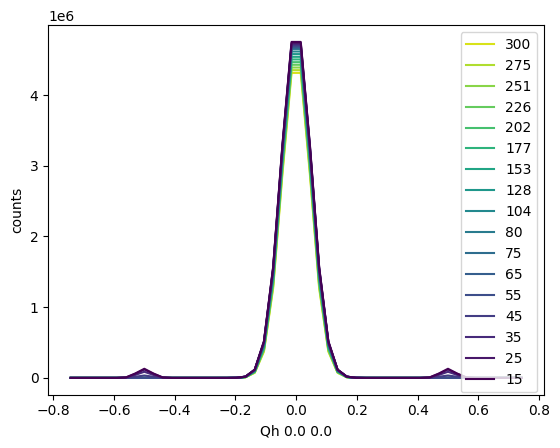
Similarly, batch plotting of the linecuts can be achieved using the .plot_linecuts() method of the TempDependence object, which internally calls the .plot_linecut() method of the Scissors objects at each temperature.
sample.plot_linecuts()
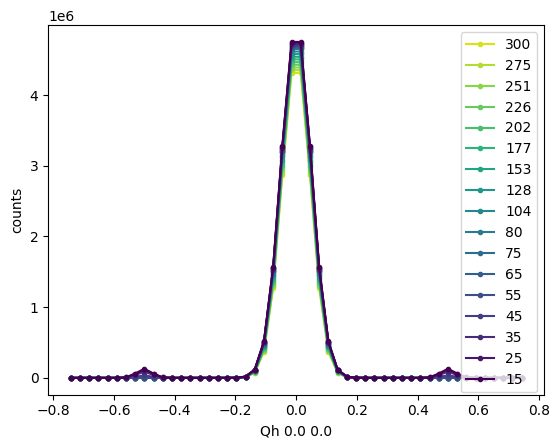
Any keyword arguments are passed to a matplotlib function ax.plot() within .plot_linecuts(), so the usual matplotlib parameters can be used to change the formatting.
sample.plot_linecuts(linestyle='-', marker='.')
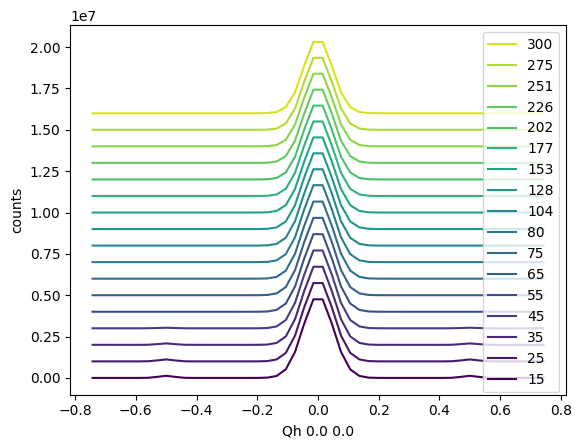
You can also introduce a vertical offset using the vertical_offset parameter.
sample.plot_linecuts(vertical_offset=1e6)
Visualizing the integration window
To visualize where the integration was performed, use the .plot_integration_window() method of the Scissors class.
sample.scissors['15'].plot_integration_window()
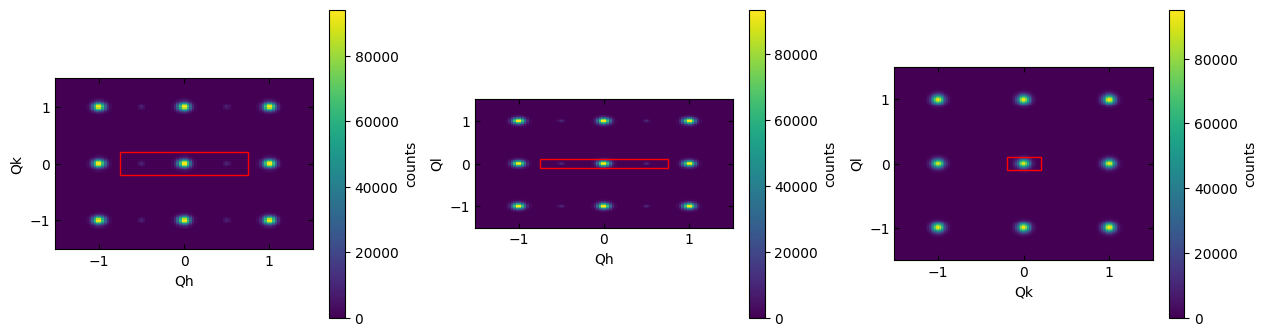
(<matplotlib.collections.QuadMesh at 0x72272cc96560>,
 <matplotlib.collections.QuadMesh at 0x72272bbac0d0>,
 <matplotlib.collections.QuadMesh at 0x72272bbdffd0>)
Use the optional width and height parameters to zoom in on the region of interest.
sample.scissors['15'].plot_integration_window(width=1.5, height=0.5)
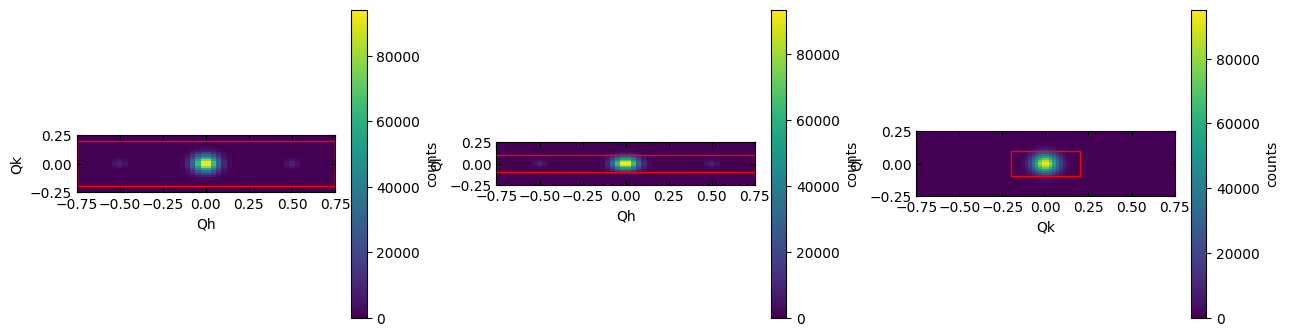
(<matplotlib.collections.QuadMesh at 0x72272ccc10f0>,
 <matplotlib.collections.QuadMesh at 0x72272cda6d40>,
 <matplotlib.collections.QuadMesh at 0x72272cff6e90>)